
Express
GitbookBackend2020-12-29
🪕 Request
-
request.body
app.use(express.json()); // for parsing `application/json` app.use(express.urlencoded({ extended: true })); // for parsing `application/x-www-form-urlencoded` - originalUrl (=baseUrl+path)
- baseUrl
- path
🪕 Response
🪕 Router
- app.route()
- express.Router()
🪕 app.use + middleware
Usually we don’t want Node.js to directly serve a website. Things like SSL or TLS encryption are doable, but a web server was exactly made for such a task. That’s why the most common setup is running Express Apps behind some reverse proxy like Nginx.
🪕 handling warning/error
🪕 集成模块
- node-fetch
- require.js
- jwttoken
- cluster
- serve-favicon
- helmet: helps secure your app by setting various HTTP headers
- passport: authentication using “strategies” such as OAuth2, OpenID, and many others.
- compression (
nginx, static files, e.g. images)
🪕 Node.js process crashing
- Always handle promise rejections. Listen to unhandled rejection events for crash reporting. And always use errors to reject promises in order to get stack traces!
- Always handle the error event for streams!
- Wrap
JSON.parse()and anySync()function in a try-catch blockorinside a Promise. Well, in general any function that can throw errors.
Note that
uncaughtExceptionis a very crude mechanism for exception handling and may be removed in the future
🪕 DOMAIN with Cluster
🪕 process.env, .env
- process.env 和 require(‘dotenv’)没有必然关系。
- 如果从~/.bash_profile 中取环境变量,就不需要。
- 如果从.env 中取环境变量,就需要。
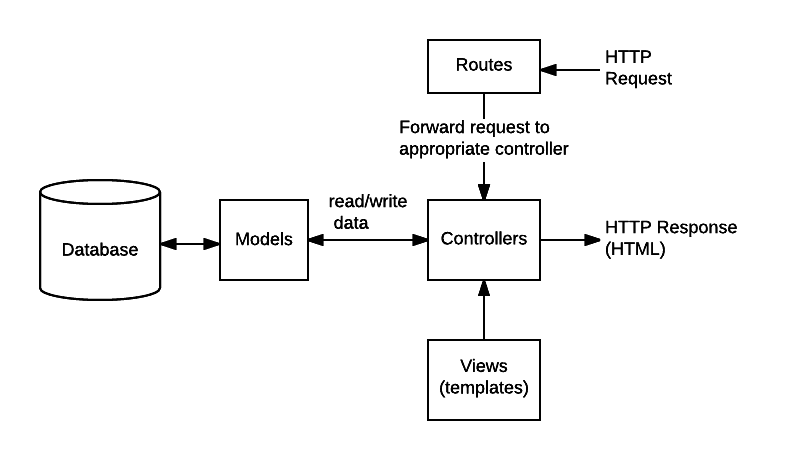
🪕 express mvc
🪕 more
knex.jsfor creating data models- websocket: express-ws
- reporting: tableau, charting tools
- schedule tasks: cron
- batch process:
- fs-extra, through2, fast-csv
⚡️File Management
There are times we just need to move a file, or remove it, or read the contents. I use the
nativefsmodule, or thefs-extramodule to perform these steps. I usethrough2when I’m using streams to process large data sets and need to pipe structured data into another step. I’ll also usefast-csvto work with CSV files.
if (!fs.existsSync(dir)) {
	fs.mkdirSync(dir);
}
📑 Log.io
Logo.io是一个基于 NodeJS 开发的实时日志监控项目,在浏览器里访问。需要注意的是,Logo.io只监视日志变动并不存储日志,不过这个没关系,只要知道日志存储在哪个机器上。
Logo.io使用Socket.io库发送活动报告的,和其他的监控工具一样,Logo.io也采用服务器-客户端的模式。Logo.io由两部分组成:server和harveste,server运行在机器 A(服务器)上监视和纪录其他机器发来的日志消息;log harvester 运行在机器 B(客户端)上用来监听和收集机器 B 上的日志改动,并将改动发送给机器 A,每个需要纪录日志的机器都需要一个harvester。